The Complete Guide to Streamlining K-12 Classroom Walkthrough Logistics and Feedback Loops
The Complete Guide to Streamlining K12 Classroom Walkthrough Logistics and Feedback Loops Classroom walkthroughs are among the most powerful tools available to K12 instructional leaders for driving teaching quality and student achievement. However, in many schools, walkthrough initiatives succumb to
The Complete Guide to Streamlining K-12 Classroom Walkthrough Logistics and Feedback Loops

Classroom walkthroughs are among the most powerful tools available to K-12 instructional leaders for driving teaching quality and student achievement. However, in many schools, walkthrough initiatives succumb to logistical friction, fragmented paperwork, and delayed feedback cycles that frustrate teachers and exhaust administrators. When instructional observations feel like compliance exercises rather than engine rooms for growth, professional development stalls across the campus. Streamlining walkthrough logistics transforms sporadic visits into an agile, data-driven feedback loop that empowers educators. This comprehensive guide outlines how school and district leaders can eliminate operational bottlenecks, standardize observation rubrics, leverage modern mobile tech stacks, deliver timely micro-coaching, and aggregate walkthrough data to fuel sustainable school-wide improvement.
1. Deconstructing the Operational Friction in Traditional K-12 Walkthroughs
Traditional observation workflows were designed for annual compliance evaluations rather than continuous instructional growth. As school leaders attempt to conduct short, frequent walkthroughs using outdated systems, administrative friction builds up quickly. Identifying and dismantling these operational bottlenecks is the essential first step toward building a responsive instructional coaching ecosystem.
1.1 The Bottlenecks of Paper, Clipboards, and Disjointed Spreadsheets
For decades, administrators navigated hallways armed with paper forms on clipboards or makeshift notes typed into disjointed spreadsheets. While paper might feel immediate during a 10-minute visit, its downstream workflow is notoriously inefficient:
- Manual Data Re-Entry: Principals spend hours transferring handwritten notes into spreadsheets or district evaluation portals, creating duplicate labor.
- Data Silos: Observations stored across individual drives or physical binders prevent leadership teams from tracking campus-wide trends in real time.
- Version Instability: Multiple spreadsheet versions result in inconsistent data collection, unstandardized scoring, and misplaced historical feedback.
Replacing tactile paper processes with integrated digital platforms eliminates double-entry friction, giving administrators back valuable time that can be reinvested into coaching conversations.
1.2 Delayed Feedback Cycles and the Erosion of Instructional Impact
The pedagogical value of classroom observation decays exponentially with every hour feedback is delayed. Educational research confirms that adult learning requires immediate, contextual feedback to drive meaningful behavior change.
When walkthrough notes are delayed by days or weeks before reaching a teacher’s inbox:
- Loss of Context: The specifics of student engagement or instructional pacing from previous days are forgotten by both teacher and observer.
- Defensive Reactions: Delayed feedback often feels like an autopsy rather than live coaching, triggering teacher defensiveness.
- Missed Practice Opportunities: Teachers continue repeating unrefined instructional practices for extended periods before receiving guidance.
To maintain instructional momentum, school leadership must institute workflows that deliver actionable feedback within 24 to 48 hours of every observation.
1.3 Administrator Scheduling Burnout and Inconsistent Observation Frequencies
Building principals, assistant principals, and instructional coaches face a constant barrage of operational emergencies, discipline calls, and parent meetings. Without structured scheduling systems, classroom walkthroughs are invariably pushed aside.
This inconsistency breeds several systemic issues:
- Unequal Coverage: High-performing or compliant classrooms are visited repeatedly, while struggling teachers or specific departments are unintentionally neglected.
- Surprise Factor: Infrequent visits heighten teacher anxiety, turning brief visits into high-stakes events rather than routine collaborative checkpoints.
- Leadership Burnout: Administrators experience guilt and fatigue from constantly missing self-imposed walkthrough quotas.
2. Standardizing the Walkthrough Framework: Brief Rubrics for High Rigor

High-impact walkthroughs do not try to evaluate an entire lesson in a single visit. Attempting to grade numerous pedagogical domains during a brief drop-in leads to superficial notes and observer fatigue. Streamlining begins with a standardized, tight framework focused on high-leverage instructional indicators.
2.1 Designing High-Impact Rubrics with 3 to 5 Targeted Indicators
Rather than adopting massive, comprehensive formal evaluation frameworks for daily drop-ins, leaders should distill weekly or monthly walkthrough rubrics down to 3 to 5 targeted indicators.
Effective indicators should be observable, objective, and actionable:
- Objective Alignment: Is the learning target posted and visibly referenced by students during task execution?
- Cognitive Lift: Are students doing the majority of the thinking, speaking, and problem-solving (e.g., peer turn-and-talks, independent problem solving)?
- Check for Understanding (CFU): Does the teacher capture real-time data using techniques like cold-calling, exit tickets, or whiteboards, and adapt instruction accordingly?
- Classroom Culture & Transitions: Are instructional routines efficient, minimizing lost learning time during transitions?
By concentrating on a narrow set of core practices aligned with current school-wide professional development goals, observers gain focus and consistency.
| Rubric Component | Traditional Formal Evaluation | Streamlined Walkthrough Protocol |
|---|---|---|
| Scope | Comprehensive (Multi-indicator) | Targeted (3 to 5 indicators) |
| Duration | 45–60 Minutes | 10–15 Minutes |
| Primary Purpose | Summative Evaluation & Rating | Formative Micro-Coaching |
| Frequency | 1–2 Times Per Year | 8–12 Times Per Year |
| Turnaround Time | Delayed (Multiple Days) | Within 24–48 Hours |
2.2 Structuring the 15-Minute Classroom Observation Protocol
A disciplined observation protocol prevents time creep and maintains consistency across leadership team members. A standardized 15-minute walkthrough follows three distinct phases:
- Minutes 0–3: Context & Environment Scan
- Enter silently without disrupting instruction.
- Scan physical space, posted learning objectives, and student work samples.
- Minutes 4–11: Student-Centered Evidence Gathering
- Kneel beside 2–3 students and ask low-level probing questions: "What are you working on today?" and "How will you know when your work is successful?"
- Script direct evidence of teacher prompts and student responses.
- Minutes 12–15: Low-Inference Data Capture
- Record exact quotes, time timestamps, and tally student participation count.
- Tag observations against the 3–5 targeted rubric indicators before exiting.
2.3 Cultivating Non-Punitive Norms and Psychological Safety Across Grade Levels
For walkthrough logistics to succeed, teachers must view observers as partners in growth rather than evaluators seeking compliance. Establishing psychological safety—a concept heavily emphasized in modern educational research—requires intentional norm-setting:
- Transparent Goals: Explicitly communicate which 3–5 indicators will be observed each month and provide teachers with the exact rubric in advance.
- Normalize Unannounced Drops: Normalize short, non-evaluative visits so that an administrator entering a room ceases to cause tension.
- Publicly Celebrate Growth: Highlight effective instructional practices observed during walkthroughs in staff bulletins and faculty meetings (with teacher permission).
3. Optimizing Logistics: Tech Stacks, Scheduling, and Mobile Workflows

Logistical excellence depends on pairing clear processes with modern digital infrastructure. Equipping leadership teams with responsive software tools and disciplined time-management strategies ensures walkthrough routines remain resilient against daily school operational friction.
3.1 Evaluating Classroom Observation Software and Mobile Data-Capture Tools
Selecting the right digital platform determines whether walkthrough data becomes actionable intelligence or sits unused in a database. When evaluating walkthrough software, school and district leaders should prioritize key capabilities:
- Mobile First Accessibility: Smooth operation on smartphones and tablets (iOS and Android) with offline data capture capability for areas with weak Wi-Fi coverage.
- Customizable Form Builders: Ability to quickly modify rubrics, add drop-down menus, tag instructional strategies, and embed speech-to-text voice dictation.
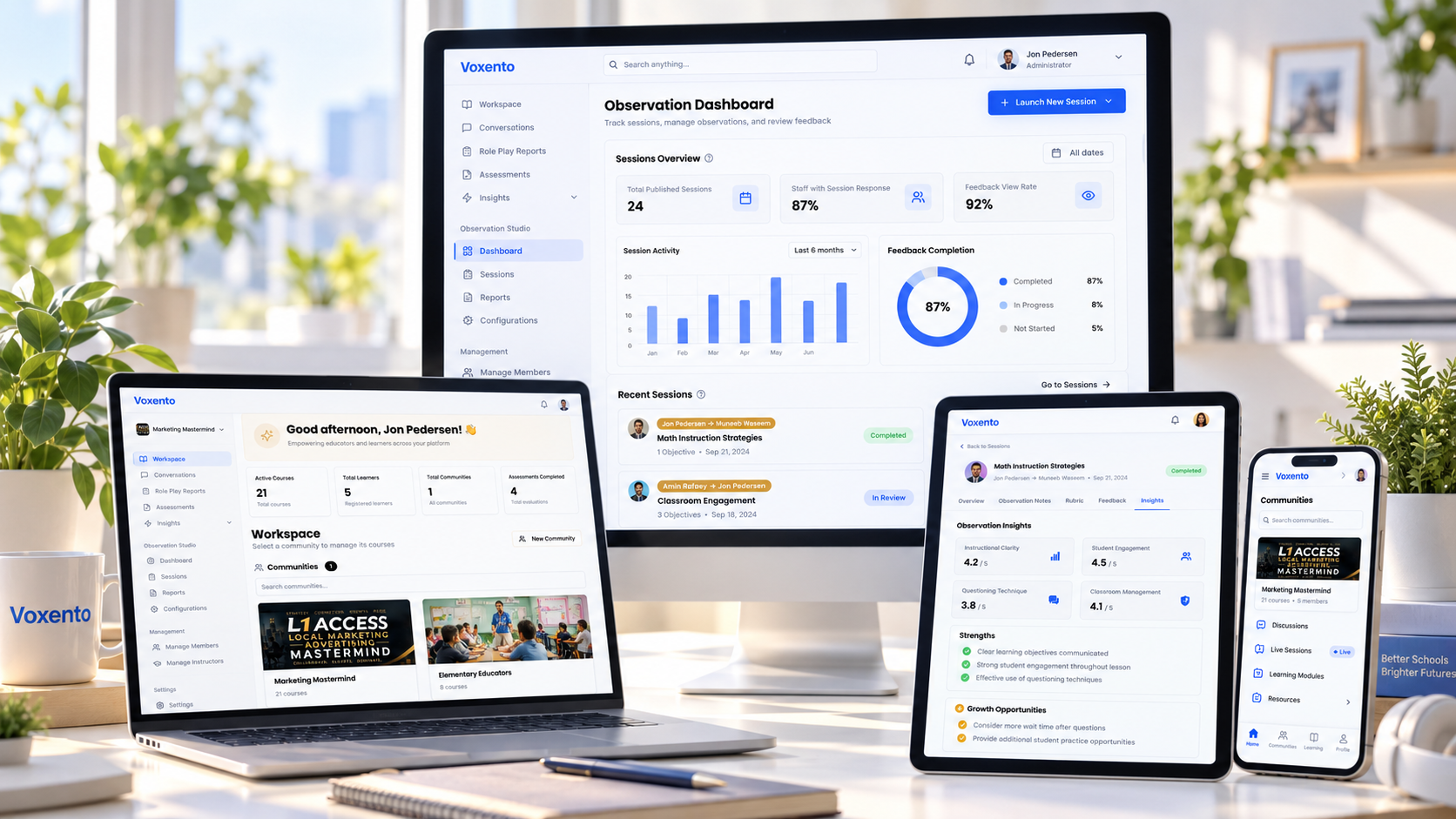
- Automated Routing & Dashboards: Automated delivery of notes to teachers upon submission, coupled with real-time analytics dashboards for administrators.
- Data Security & Privacy: Compliance with FERPA and district security mandates regarding staff and student records.
Popular tools ranging from specialized platforms (like TeachBoost, KickUp, or Edthena) to customized Google Workspace forms can be tailored to meet these operational criteria depending on district budget and technical capacity.
3.2 Time-Blocking Strategies for Consistent Administrator Presence
If walkthroughs are not scheduled, they rarely happen. Successful instructional leaders treat classroom visits as non-negotiable appointments by applying strict calendar management strategies:
[08:00 - 08:30] Morning Arrival & Hallway Presence
[08:30 - 09:15] Operations & Urgent Administrative Mail
[09:15 - 10:30] BLOCK A: Classroom Walkthroughs (5 Rooms x 15 Min)
[10:30 - 11:30] Parent Conferences / Scheduled Meetings
[11:30 - 12:30] Lunch Duty & Campus Supervision
[12:30 - 01:15] Operations & Response Window
[01:15 - 02:30] BLOCK B: Classroom Walkthroughs & Micro-Debriefs
[02:30 - 03:30] Daily Data Processing & Follow-up Communications
- The "2x5" Weekly Standard: Aim for 2 daily walkthrough blocks of 5 rooms each, yielding 50 observations per week across an administrative team.
- Protected Calendar Blocks: Color-code walkthrough blocks in Google Calendar or Outlook as "Busy / High Priority."
- Reciprocal Coverage: Pair assistant principals to cross-cover operational duties (e.g., student discipline or facilities calls) so one leader remains untouched during their observation window.
3.3 Automating Administrative Tasks and Instant Data Synchronization
To eliminate manual data entry entirely, modern mobile workflows rely on automated triggers:
- Speech-to-Text Dictation: Observers utilize native voice dictation on tablets to record low-inference evidence while walking between classrooms.
- Automated PDF & Email Triggers: Upon tapping "Submit," the system generates a formatted summary email sent directly to the teacher’s inbox.
- Centralized Data Warehousing: Observation entries automatically update a cloud database (e.g., Google Looker Studio, Power BI, or district SIS integration), populating school-wide trend analytics instantly.
4. Closing the 48-Hour Feedback Loop: Micro-Coaching & Communication Protocols

The primary goal of a walkthrough is not data collection; it is driving professional growth through clear feedback. Adopting a strict 48-hour feedback protocol ensures observations translate into immediate, actionable classroom adjustments.
4.1 Delivering Growth-Oriented Written Feedback (With Copy-and-Paste Templates)
Effective written feedback must strike a balance between positive reinforcement of strong practices and focused prompts for refinement. Using structured feedback formulas accelerates written communication while maintaining quality.
The "Glow & Grow" Written Feedback Formula
- Glow (Praise): A specific, low-inference observation detailing what went well.
- Evidence: Exact quote or data captured during the visit.
- Grow (Actionable Question/Prompt): A bite-sized tweak to elevate rigor or engagement.
TEMPLATE 1: Focus on Student Engagement & Cognitive Lift
--------------------------------------------------------------------------------
Hi [Teacher Name],

GLOW: I loved seeing how quickly your 3rd period transitions into their small-group literacy stations today.

EVIDENCE: Within 90 seconds of your verbal prompt, 100% of students were at their assigned stations with materials open and engaged in independent reading.

GROW: To boost cognitive lift during group discussion, consider replacing the direct Q&A with a 60-second "Turn and Talk" before calling on individual responders. How might this increase participation for your quiet readers?

Thanks for your dedication!
[Observer Name]
TEMPLATE 2: Focus on Checking for Understanding (CFU)
--------------------------------------------------------------------------------
Hi [Teacher Name],

GLOW: Great job using real-world applications during your algebra modeling lesson today!

EVIDENCE: At 10:15 AM, 18 out of 20 students were actively writing down their equations based on the budget scenario you presented.

GROW: I noticed 4 students struggled on Question #2. How might using mid-lesson digital exit tickets or individual whiteboards help you catch those misconceptions before students transition to independent practice?

Best,
[Observer Name]
4.2 Executing the 5-Minute Micro-Coaching Debrief Strategy
Written feedback should be complemented by short, face-to-face debriefs. The 5-Minute Micro-Coaching Debrief strategy—derived from core instructional leadership principles—keeps conversations focused, supportive, and efficient.
       [0:00 - 1:00]  Step 1: Praise & Relationship Building
            │
            ▼
       [1:00 - 2:30]  Step 2: Guided Self-Reflection Question
            │
            ▼
       [2:30 - 4:00]  Step 3: Co-Design Action Step & Model
            │
            ▼
       [4:00 - 5:00]  Step 4: Lock In Implementation Timeline
- Praise (1 Min): Validate a specific success observed during the walkthrough.
- Guided Reflection (1.5 Mins): Ask a targeted question: "What did the student work tell you about their mastery of today’s objective?"
- Action Step & Modeling (1.5 Mins): Co-design a concrete practice change. If necessary, the coach briefly models the technique.
- Implementation Timeline (1 Min): Agree on when the teacher will test the action step (e.g., "I'll try this cold-calling strategy tomorrow during 2nd period").
4.3 Establishing Collaborative Action Steps and Teacher Reflection Loops
To foster true ownership, walkthrough systems should encourage two-way communication. Modern observation platforms feature built-in reflection fields where teachers can reply to walkthrough notes, attach revised lesson plans, or request a follow-up visit. This reciprocal loop shifts the culture from compliance monitoring to collaborative coaching.
5. Leveraging Aggregated Walkthrough Data for School-Wide Instructional Leadership

When individual walkthrough snippets are collected systematically, they aggregate into rich data sets. School leaders can analyze these trends to direct resources, design targeted professional development, and evaluate instructional initiatives across grade levels and departments.
5.1 Converting Individual Observation Snippets into Meaningful Trend Analytics
Isolated observations provide a snapshot of a single classroom; aggregated data illuminates school-wide patterns. By categorizing walkthrough entries by grade level, department, and rubric indicator, leadership teams can evaluate metrics such as:
- School-Wide Indicator Mastery Rates: Percentage of observed classrooms demonstrating consistent checks for understanding or rigorous questioning.
- Observation Frequency Distribution: Ensuring equitable distribution of visits across all teachers and subject areas.
- Time-Trend Tracking: Monitoring how quickly new instructional strategies gain traction following professional development workshops.
5.2 Aligning Targeted Professional Development Decisions with Real-Time Classroom Data
Traditional Professional Development (PD) often suffers from a disconnect between topic selection and actual classroom needs. Walkthrough data bridges this gap:
- Data-Driven Topic Selection: If walkthrough data reveals that a majority of classrooms struggle with student-led discourse, the next campus professional development session can be devoted specifically to structured dialogue protocols (e.g., Socratic seminars or Kagan structures).
- Identifying Campus Exemplars: Aggregated data highlights teachers who excel in specific domains. Leaders can invite these master teachers to facilitate peer observations, host lab classrooms, or lead micro-workshops.
- Evaluating PD ROI: By tracking walkthrough indicators before and after a training initiative, leaders can measure the true implementation rate and return on investment of professional development efforts.
5.3 Measuring Coaching Impact and Scaling Walkthrough Logistics Across District Schools
For district-level administrators, scaling walkthrough protocols across multiple campuses requires standardization and continuous calibration:
- Inter-Rater Reliability Calibration: District leaders conduct joint walkthroughs with campus principals twice per semester to ensure rubrics are applied consistently across schools.
- Coaching Growth Metrics: Tracking the growth curve of teachers receiving weekly micro-coaching versus those receiving traditional sporadic visits.
- District Dashboarding: Centralized analytics dashboards enable superintendents and curriculum directors to identify high-performing campuses, reallocate instructional coaching resources, and share best practices district-wide.
Conclusion
Streamlining K-12 classroom walkthrough logistics and feedback loops transforms routine school visits into a powerful driver of continuous instructional improvement. By replacing fragmented paper methods with streamlined mobile tools, standardizing focused rubrics, protecting administrative time through disciplined time-blocking, and enforcing a tight 48-hour feedback loop, school leaders build a transparent culture centered on growth. When instructional walkthroughs are predictable, efficient, and data-informed, teachers receive the meaningful support they need, administrators gain actionable school-wide insights, and—most importantly—student learning thrives.



Next step
Need help applying this pattern?
Bring the bottleneck and the stack. We will map the first implementation path.