API integration services

Connect your tools into one reliable workflow.

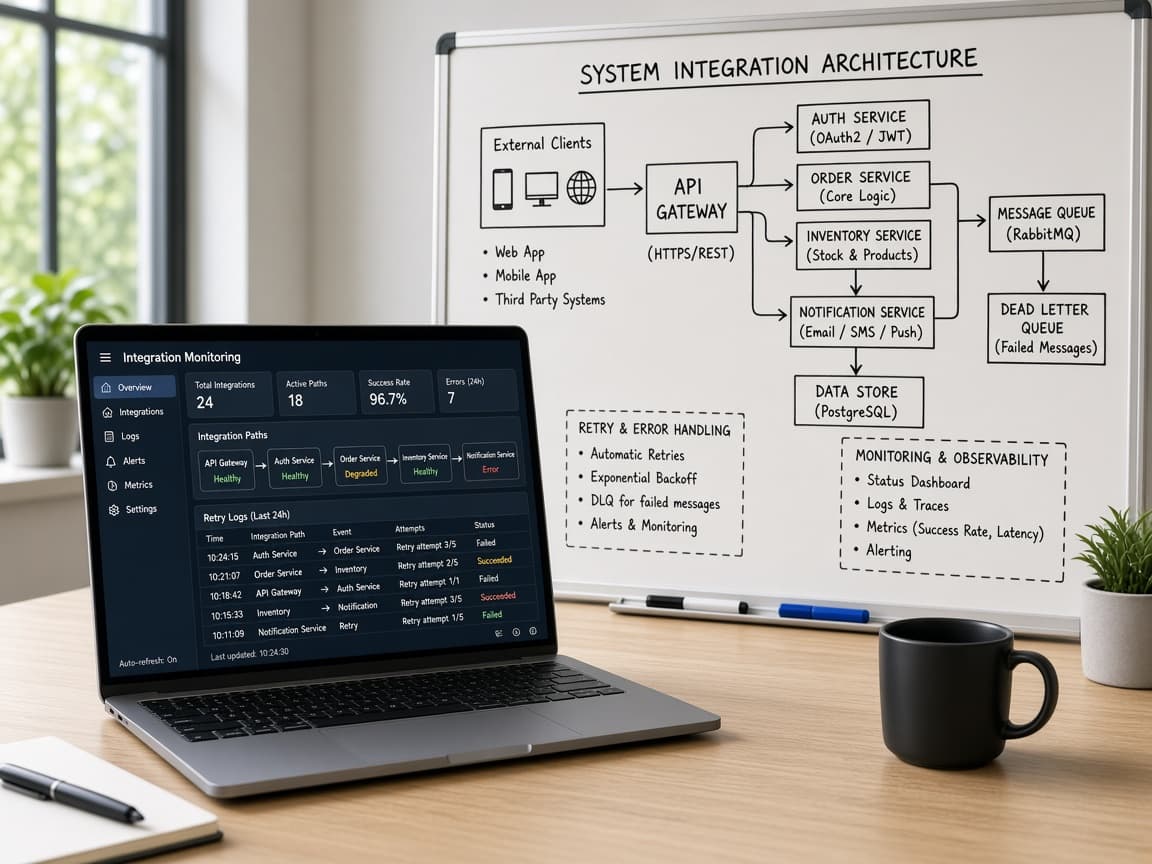
Design API, webhook, middleware, and data-sync layers with source truth, retry behavior, monitoring, and ownership planned upfront.

See integration proof
Integration proof

Commerce, ERP, CRM, reporting, and AI workflows connected around clear source-of-truth rules.

View integration proof
Outcome
Systems that update without manual chasing
Mechanism
APIs, webhooks, transforms, retries, and alerts
Risk reducer
Failure modes and source truth mapped first
APIs
System connections
Webhooks
Event-driven sync
Retries
Failure handling
Dashboards
Visibility
Strategy call

Leave with the first move mapped.

The call is useful even if we do not build together. We use it to clarify what should happen next, what can wait, and what could make the project expensive.

Scope map
Users, systems, first release
Risk list
Unknowns to resolve early
Build path
Milestones and ownership
Range
Timeline and budget signals
Free checklist

API Integration Risk Map Checklist

Pressure-test source truth, retries, rate limits, failure states, ownership, and monitoring before connecting tools.

  • Failure modes
  • Retry rules
  • Monitoring
Open integration checklist
Problems and use cases

Built for systems that should share truth without manual patching.

Integration work is strongest when it removes repeated reconciliation, duplicate entry, delayed reporting, or workflow breaks between important tools.

Sync gaps

Records do not update across systems

Orders, customers, invoices, payments, inventory, or tasks need reliable movement between platforms.

Webhooks

Events are missed or handled inconsistently

Webhook delivery, retries, idempotency, and failure visibility need a stronger design.

Middleware

Direct point-to-point sync has become fragile

Data needs validation, transformation, routing, queueing, or logging between systems.

Automation

Zapier-style workflows are not enough

The workflow needs custom rules, scale, observability, or security beyond simple triggers.

Reporting

Dashboards depend on late manual exports

Leadership needs cleaner data movement before reports can be trusted.

AI

AI needs access to live business data

AI workflows need controlled reads, writes, approvals, and source-aware integration with operational tools.

Desired transformation

Move from brittle handoffs to reliable data movement.

The outcome is not simply two tools connected. It is a workflow where records move predictably, errors are visible, and teams can trust what each system shows.

01

Less duplicate entry

02

Fewer sync exceptions

03

Clearer system ownership

04

Better reporting inputs

05

More automation capacity

Service offer

A complete API integration delivery lane.

The engagement can include system mapping, API review, integration architecture, webhook development, middleware, data transformation, auth, QA, observability, deployment, documentation, and support.

Scoped offer

Integration quality is proven by how failures are handled.

We plan retries, idempotency, logs, error states, ownership, and human review for the cases where systems do not behave perfectly.

01

System map

Identify source truth, destination needs, and workflow risk.

View phase checklist
  • Data inventory
  • API review
  • Ownership rules
  • Failure cases
02

Architecture

Design the event, sync, transform, and monitoring layer.

View phase checklist
  • Webhooks
  • Middleware
  • Queues
  • Logging
03

Implementation

Build and connect the integration safely.

View phase checklist
  • API clients
  • Transforms
  • Auth
  • Tests
04

Launch

Validate real events and support handover.

View phase checklist
  • QA data
  • Monitoring
  • Docs
  • Support
Capabilities

Integration capabilities for operational systems.

Good integrations combine data modeling, workflow judgment, security, reliability, and operational visibility.

API connections

Read/write logic between important tools.

View capabilities
  • REST APIs
  • GraphQL
  • OAuth
  • API clients

Event workflows

Event-driven sync with failure handling.

View capabilities
  • Webhooks
  • Retries
  • Idempotency
  • Queues

Data movement

Clean records before they reach the next system.

View capabilities
  • Validation
  • Transforms
  • Deduping
  • Normalization

Observability

Make sync health visible after launch.

View capabilities
  • Logs
  • Alerts
  • Dashboards
  • Audit trails
Integration types

What we can connect.

Integration projects vary by system access and business risk, but the operating principle is the same: make the workflow easier to trust.

01

CRM and ERP integrations

Customer, order, invoice, inventory, and pipeline records across business systems.

02

Shopify and ecommerce sync

Storefront, returns, payments, inventory, accounting, and reporting workflows.

03

Payment and accounting workflows

Invoices, transactions, refunds, settlement, fees, and reconciliation context.

04

AI data integrations

Controlled data access and writeback for copilots, agents, reports, and automation.

05

Custom middleware

A durable layer for transformations, retries, logs, and routing between tools.

Process

An integration process that makes failure modes visible.

The process traces source truth, event timing, transforms, retries, access, and reporting needs before implementation.

01

Fit and workflow discovery

We clarify the users, business workflow, systems, constraints, and success criteria before recommending a build path.

02

Roadmap and architecture

The first release, integration boundaries, technical risks, milestones, and acceptance criteria are turned into a practical plan.

03

Design and build iterations

UX, frontend, backend, data, integrations, and QA move in visible increments with working demos at key checkpoints.

04

Launch and handover

Deployment, monitoring guidance, documentation, source-code access, and post-launch stabilization are handled before the work is closed.

Risk reducers

Controls that reduce integration fragility.

Integrations fail when edge cases, retries, auth expiry, duplicate events, and ownership are ignored. The engagement makes those risks explicit.

Technology stack

Integration stack selected around reliability.

Common options include REST, GraphQL, OAuth, webhooks, queues, cron jobs, serverless functions, Node.js, Python, PostgreSQL, Redis, Shopify APIs, Stripe, QuickBooks, GoHighLevel, HubSpot, Odoo, and AI APIs.

Use APIs and webhooks when systems provide reliable event access.

Use middleware when point-to-point sync becomes fragile.

Add logs and alerts so failures are inspectable.

Design idempotency for duplicate or retried events.

Document ownership so future changes are easier.

Milestone-based delivery

The project is broken into decision checkpoints so scope, cost, and quality stay visible while the product is still adjustable.

Staging access

You can review working flows in a controlled environment before they reach customers, staff, or production systems.

Acceptance criteria

Important user flows, integration behavior, edge cases, and handover expectations are agreed before final sign-off.

Source-code access

Repository access and handover expectations are clarified so the product does not become trapped with the delivery team.

QA and release support

Functional testing, responsive checks, deployment support, and post-launch defect handling are treated as part of delivery.

Founder-led scoping

Senior product and engineering judgment stays close to the engagement instead of disappearing after the sales conversation.

Comparison

Why not just use Zapier or a native connector?

Native connectors and automation tools are good starts. Custom integration becomes valuable when business rules, failure handling, data quality, or scale matter.

Business rules

Custom validation, transforms, and exception logic fit the workflow.

VS

Business rules

Simple triggers move bad data faster.

Reliability

Retries, logs, and ownership are designed.

VS

Reliability

Failures become invisible until a person notices.

System control

The integration layer can evolve with the product.

VS

System control

The business is limited by connector settings.

Before you connect

Plan the failure paths before the integration fails.

Reliable integrations are designed around source truth, retries, monitoring, and ownership, not just successful API calls.

01

What happens when an API call fails?

We map retries, alerts, skipped records, manual review paths, and who owns each failure state.

02

Which system should be the source of truth?

Source ownership is defined per record type so sync logic does not create conflicting updates.

03

Can we see whether the sync is healthy?

Logging, monitoring, and exception visibility are planned before data starts moving in production.

FAQ

Questions buyers ask about api integration services.

These answers reduce the practical uncertainty that usually appears before a serious service conversation.

01

What systems can TkTurners integrate?

We can integrate CRMs, ERPs, Shopify, payment systems, accounting tools, AI APIs, internal apps, databases, reporting tools, and custom APIs depending on access.

02

Do you build webhooks?

Yes. We can build webhook receivers, retry handling, idempotency logic, event processing, logs, and alerts.

03

Can you replace Zapier workflows?

Yes. If no-code automations have become fragile, expensive, or hard to monitor, we can scope a custom integration or middleware layer.

04

Can you connect AI to business systems?

Yes. AI workflows can read from and write to systems when permissions, data quality, human review, and security are planned correctly.

05

How do you test integrations?

Testing can include sample payloads, edge cases, duplicate events, failed requests, auth expiry, staging data, and production smoke checks.

06

What affects integration cost?

Cost depends on API quality, auth, number of systems, data transformation, error handling, observability, QA, and deployment needs.

07

Can you repair an existing integration?

Yes. We can review failure logs, data gaps, API behavior, webhook delivery, duplicate records, and reporting mismatches before proposing a fix.

Next step

Bring the project, workflow gap, or current system to one strategy call.

We will use the conversation to understand fit, scope, risk, required systems, and the first useful release before recommending a delivery path.

Useful call inputs

  • What outcome you need
  • What systems or users are involved
  • What has already been tried