Create a cleaner intake system for project inquiries, estimates, and pre-build handoffs.
General contractors often manage messy early-stage information across calls, forms, email threads, and site visits. This blueprint is built to standardize intake, keep estimate follow-up moving, and improve the handoff into active project planning.
Why the funnel helps
How the funnel helps
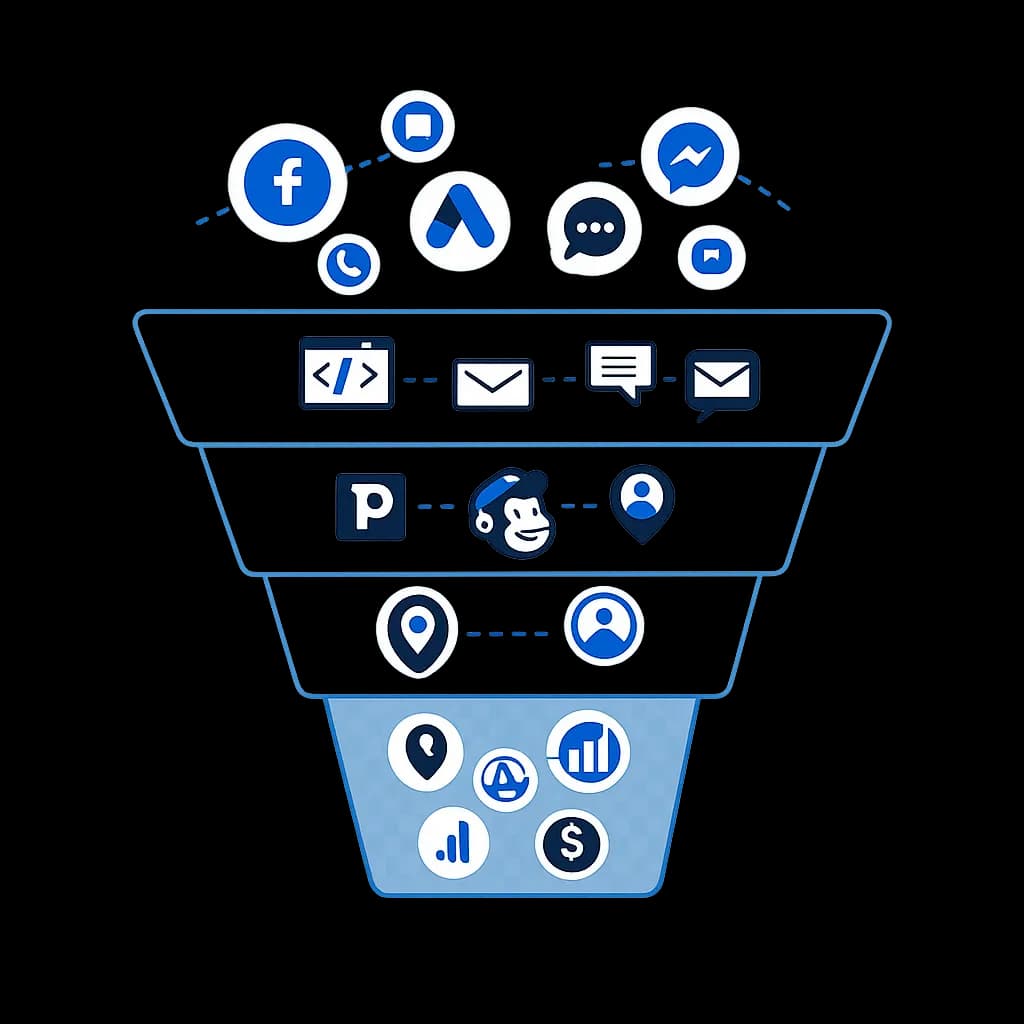
This funnel turns the blueprint into one visible flow: where leads come from, how they enter the CRM, how follow-up happens, and what gets tracked once the opportunity becomes real. It helps buyers understand the system as one connected path instead of a list of disconnected automations.
Top of funnel clarity
It shows how ads, calls, chat, and inbound messages can all feed one intake path instead of being handled in separate silos.
Mid-funnel follow-up and routing
It makes the nurture layer concrete: forms, email, SMS, booking, and CRM stages work together so the team knows what happens after the first inquiry.
Bottom-funnel visibility
It connects routing, reporting, and revenue signals, which helps explain why the build matters operationally and not just visually inside the CRM.
Common automation gaps
Most general contractors businesses do not need more software first. They need cleaner structure around the repeatable intake, follow-up, and handoff work that already exists.
Incomplete inquiry details
Project leads arrive with missing scope, timing, or budget context, which slows down qualification and estimate preparation.
Estimate process drift
Follow-up after site visits or early calls depends too heavily on individual memory and scattered notes.
Preconstruction handoff gaps
When a lead turns into a real job, important context can get lost between sales and delivery.
How the contractor system should be structured
The system needs to organize messy early-stage details without overcomplicating the sales process.
Project intake framework
Capture project type, timeline, property details, and scope signals before the lead hits the estimate queue.
Estimate coordination
Use structured stages, internal tasks, and reminders so site visits and estimate preparation stay visible.
Proposal follow-up
Automate the check-ins that keep qualified prospects moving after the estimate has been delivered.
Job-start handoff
Package approved scope notes, files, and next-step tasks so the operations side receives a cleaner record.
Contractor inquiry-to-project workflow
The workflow moves the lead from first inquiry through estimate review and handoff into active work.
- 01
Collect structured intake
Forms, calls, and referrals create a record with project details, property information, and intent signals.
- 02
Schedule the next discovery step
Book an estimate visit or consult while automatically gathering anything missing before the meeting.
- 03
Follow up after the estimate
Use pipeline-triggered reminders and internal tasks to keep qualified prospects from stalling silently.
- 04
Hand off the approved project
Won opportunities move into a defined handoff stage with the notes and files delivery needs.
What should improve for a contractor team
The system is meant to make early-stage project work easier to manage, not more complicated.
Expected operating lift
The goal is not more CRM activity for its own sake. The system should make routing clearer, follow-up easier to trust, and reporting more useful for day-to-day decisions.
Cleaner intake records
The team gets better information earlier instead of reconstructing project details later.
More consistent estimate follow-up
Qualified leads stay active in the pipeline instead of fading out because no next action was triggered.
Less handoff confusion
Operations receives better context once a project is ready to move forward.
Frequently asked questions
This section answers the practical questions people usually have before they decide whether a general contractors automation build is worth exploring.
How can automation improve lead follow-up for general contractors?
Automation helps general contractors by connecting lead capture, intake, reminders, and next-step follow-up in one system. Instead of relying on manual callbacks, inbox checks, or memory, the team gets a clearer process for moving inquiries toward estimate intake + handoff and keeping momentum after the first contact.
What should an automation system include for general contractors?
A practical general contractors automation setup should usually include project intake framework, estimate coordination, proposal follow-up, plus clean reporting and stage visibility. The goal is to make intake, routing, booking, and follow-up easier to manage day to day instead of creating more admin work.
Can GoHighLevel work for general contractors?
Yes, if the account is built around the real workflow instead of a generic template. For general contractors, GoHighLevel is most useful when it handles forms, calendars, SMS or email follow-up, pipeline stages, and reporting in a way the team can actually use consistently.
Is this general contractors blueprint customized during implementation?
Yes. TkTurners uses the blueprint as a practical starting point, then maps the actual intake sources, pipeline stages, appointment rules, handoff steps, and reporting needs before implementation. The final setup should match the way the team sells, books, follows up, and measures work in the real operation.
Can this general contractors workflow be adapted to our current process?
Yes. The blueprint is a starting structure, not a rigid template. During implementation, the intake questions, routing rules, calendars, follow-up timing, and reporting can be adjusted to match your lead sources, team workflow, and current tools.
Map it to your process
Need a contractor intake system built around real project handoffs?
We can tailor this blueprint to your inquiry channels, estimate flow, and preconstruction handoff needs.